Your Databricks Notebook Belongs in Production
Why the Notebooks vs Python script is the wrong argument!

I watched a video from a popular data influencer talking about notebooks versus scripts, and the argument was basically this: notebooks are for testing and development only, not for production.
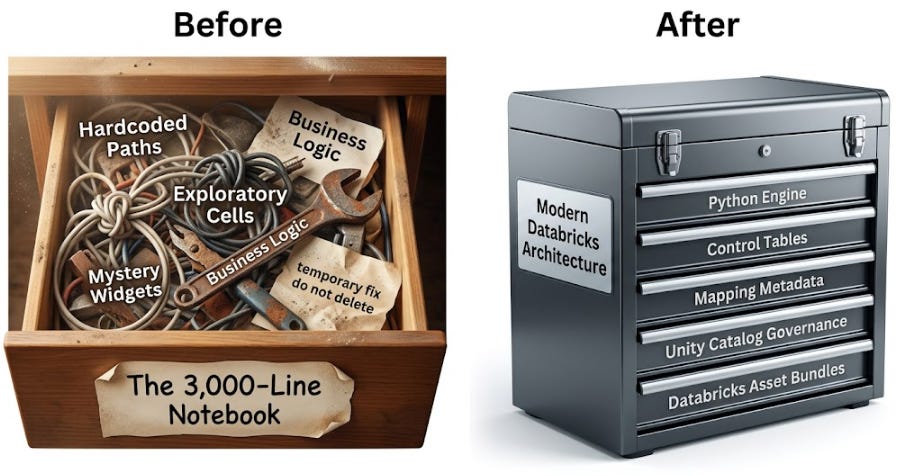
It is a common take. It is also not completely wrong, which is what makes it dangerous. The advice sounds mature because plenty of production notebooks are a disaster. Everyone who has spent enough time in Databricks has seen the 3,000-line notebook with hardcoded paths, mystery widgets, duplicated business logic, and a cell named something like temporary fix do not delete that quietly controls half the finance dashboard.
In my 26 years in data I’ve seen the same in sprocs, monolithic py scripts, and beasts of SSIS packages. All running businesses, producing data critical to the company, and all kept together by Dave. We all have a Dave.
And, that notebook, should not be in production. No argument there.
But “never use notebooks in production” is too blunt to be useful. It turns a design problem into a file-format argument. The real question is not whether a production artifact ends in .py or lives inside a Databricks notebook.
The real question is much more important:
What responsibility is this artifact being asked to own?
That is where the conversation usually gets lazy. A notebook that owns everything is a problem. A script that owns everything can also be a problem. Moving messy logic from a notebook into a Python file doesn’t magically create good architecture. Sometimes all you’ve done is hide the mess behind a more “acceptable” extension.
A better answer for enterprise Databricks is not “notebooks or scripts.” It is a hybrid architecture with clean responsibility boundaries. Thin notebooks can serve as visible orchestrators for Medallion workflows. Python modules can own reusable, testable business logic. Unity Catalog tables can store governed metadata for control, mappings, rules, and ownership. Declarative Automation Bundles (what DBX is calling DABs this week) can deploy the whole thing consistently across environments.
That is the difference between arguing about syntax and designing a platform.
The junior version of the debate
The junior version of this debate usually sounds like this:
“Notebooks are bad for production because they are hard to test.”
That statement has a valid concern buried inside it. Business logic should not be trapped in notebook cells where testing is awkward, reuse is weak, and deployment discipline is often optional. If your transformation rules, merge conditions, exception handling, data quality checks, and schema logic all live directly inside a notebook, you have built something fragile.
The problem is that people often jump from that valid concern to the wrong conclusion.
They say notebooks should never be used in production. What they should say is that notebooks shouldn’t be used as the primary home for business logic.
Those are very different statements.
A notebook can be a terrible place for complex transformation rules and still be a useful place for orchestration. It can be the visible execution surface that shows what the pipeline is doing, where it is in the process, which layer is running, which table group is being processed, and where a failure occurred. In Databricks, that visibility has real operational value.
When a pipeline fails at 2:00 AM, nobody is admiring the purity of your codebase. They are trying to figure out what broke, what data is stale, and whether the business dashboard can be trusted before the morning meeting. Pure scripts can absolutely support that, but only if the surrounding observability and job design are strong. Without that, production support turns into spelunking through logs and stack traces.
That is not a win. That is just suffering with better file hygiene.
The real issue is responsibility overload
Bad production notebooks usually fail because they own too many responsibilities.
They read from sources. They infer schemas. They transform columns. They apply business rules. They write audit records. They perform merges. They handle errors. They define table-specific behavior. They send notifications. They manage environment paths. They contain exploratory cells that were never removed. They somehow know too much and explain too little.
At that point, the notebook is not an orchestrator. It is a junk drawer with compute attached.
But this same responsibility overload can happen in scripts. A 1,200-line Python file with hardcoded table names, nested conditionals, vague log messages, and one-off business rules is not automatically better because it lives in a repository. It may be easier to lint. It may be easier to import. It may be easier to test parts of it. But if the responsibilities are still tangled together, the architecture is still weak.
That is why “notebooks versus scripts” is the wrong framing. The better framing is this:
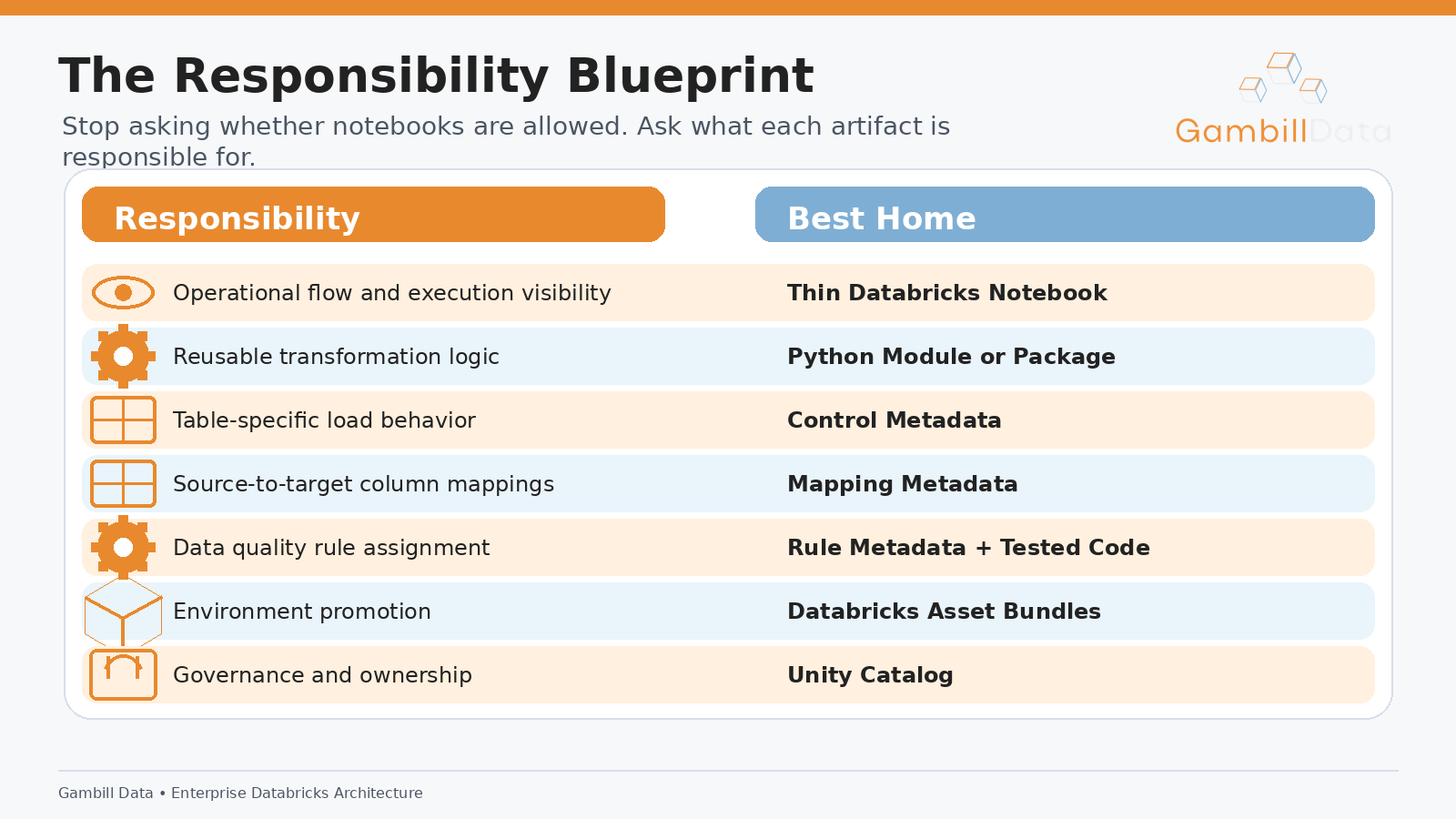
Once you frame the problem this way, the debate gets a lot more useful. The notebook is no longer being defended as a place to dump logic. The script is no longer being treated as a magic architecture wand. Each layer has a specific job.
That is what production needs.
The cockpit and the engine
The cleanest way to think about this architecture is with a simple analogy.
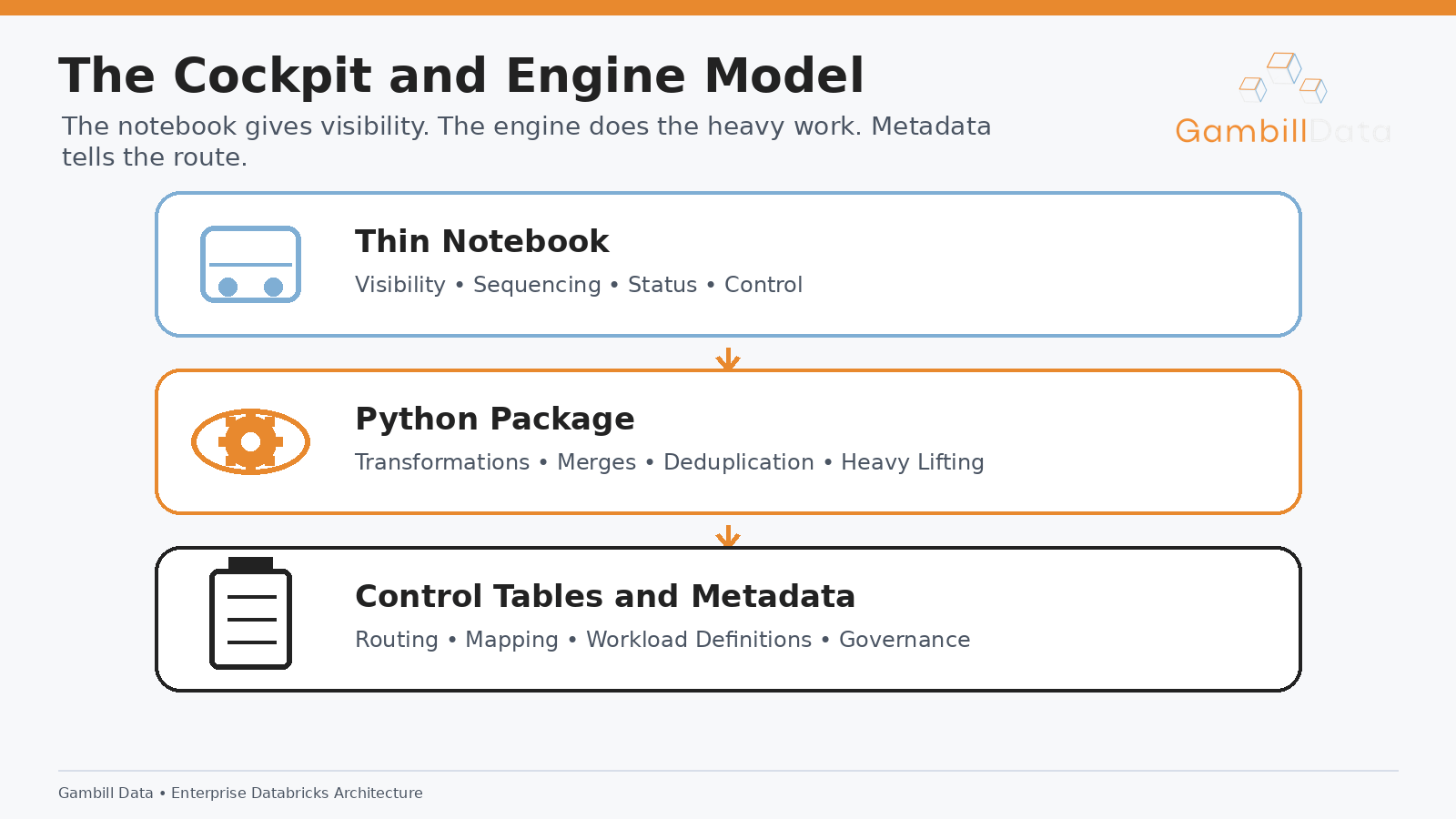
The notebook is the cockpit. The Python package is the engine. The metadata tables are the flight plan. Unity Catalog is the governed control tower. Databricks Asset Bundles are how you deploy the aircraft consistently from one environment to the next.
The cockpit does not generate thrust. That is not its job. The engine does the heavy work. But you would not remove the cockpit just because the engine is where the power lives. The cockpit gives the operator visibility, sequencing, status, and control.
That is exactly how I think about notebooks in production Databricks.
A production notebook should not be massive. It should not contain the important business logic. It should not be the only place where source-to-target behavior is defined. It should not be where every one-off rule goes to disappear forever.
A good production notebook should be thin enough that you can read it quickly and understand the shape of the run. It should accept parameters, resolve the environment, read the right control metadata, call the processing engine, display meaningful status, write audit information, and fail loudly when something important goes wrong.
That is not sloppy notebook development. That is orchestration.
The Python engine, meanwhile, should handle the reusable logic. It should enforce schema patterns, apply transformations, deduplicate records, manage watermarks, run data quality checks, perform Delta merges, write audit entries, and handle standard exceptions. Those functions can be tested, packaged, reused, and promoted through a normal engineering workflow.
The metadata layer should define the variation across sources, tables, and layers. That includes source systems, load types, primary keys, watermark columns, active flags, processing order, mapping rules, PII classifications, and validation groups.
When these responsibilities are separated, the architecture becomes easier to operate, easier to test, and easier to scale.
Control tables are where scale begins
A control table is one of the most useful tools in a mature Databricks architecture because it changes how you onboard and operate pipelines. Instead of creating a custom notebook or script for every table, you describe the workload in governed metadata and let the platform execute repeatable patterns.
A typical control table might include fields like source system, source object, target catalog, target schema, target table, Medallion layer, load type, primary key, watermark column, active flag, processing order, owner, and rule group. The exact design depends on the platform, but the purpose is consistent: tell the system what should run and how that workload should behave at a high level.
That sounds simple, but it changes the operating model.
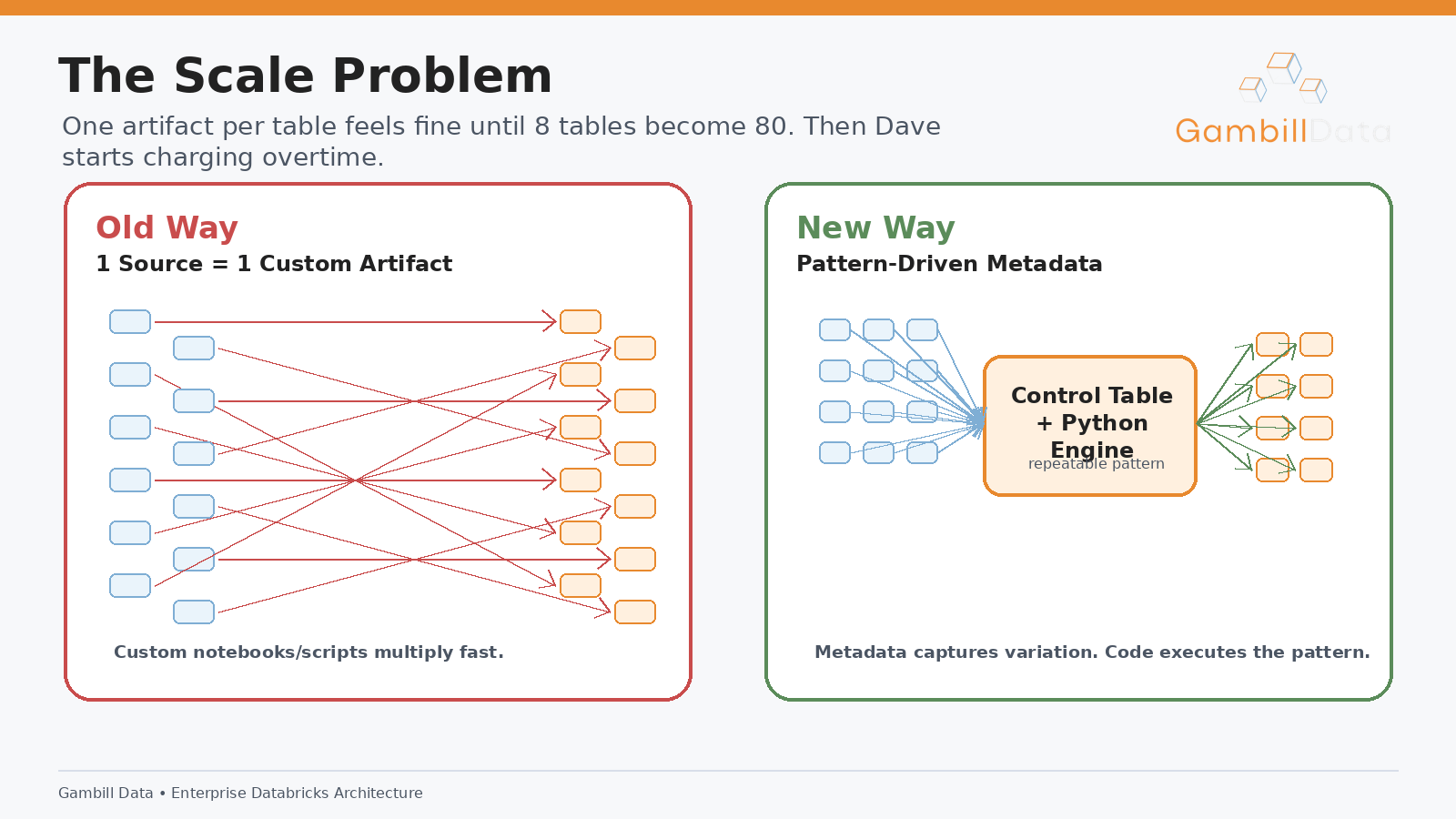
Without a control table, teams often end up with one notebook per table or one script per table. At first that feels manageable because there are only a few tables. Then there are twenty. Then eighty. Then two hundred. Each pipeline has a slightly different implementation because different engineers built them at different times with different assumptions. Eventually, even simple changes become expensive because the team has to hunt through dozens of artifacts to understand behavior.
With a control table, the orchestrator can read active workloads for a given source system, layer, or table group. It can pass those workloads into a reusable Python engine. It can execute common Bronze, Silver, or Gold patterns based on metadata.
The point is not to turn every engineering decision into metadata. That is its own kind of madness. The point is to extract repeatable variation. If fifty tables differ mainly by source name, target name, primary key, watermark, and load type, those differences do not need fifty custom notebooks.
They need a pattern.
Mapping tables keep business decisions visible
Control tables define what runs. Mapping tables define how data moves.
A mapping table can define the source column, target column, target data type, transformation rule, nullability, default value, business definition, and classification. For example, AccountId may become customer_id, CreatedDate may become created_at, and Email may be classified as PII with a standard masking or normalization rule.
This is not just a technical convenience. It is a way to make decisions visible.
In weak architectures, source-to-target logic gets scattered across notebooks, scripts, SQL statements, and old documentation nobody trusts. One pipeline calls a field customer_id. Another calls it acct_id. A third keeps the original source name because someone was apparently trying to save money on vowels.
Eventually, the team cannot explain why related fields are named differently or transformed inconsistently. That becomes a governance issue, a data quality issue, and a trust issue.
Mapping metadata helps reduce that chaos. It gives the platform a place to define field movement and transformation intent. The actual transformation implementation can still live in Python code, especially if it is complex. The metadata can reference a named rule, while tested code defines exactly what that rule does.
That split matters. Metadata should describe repeatable configuration and governed variation. Code should execute behavior. The notebook should show the run.
When mapping decisions are visible, the platform becomes easier to inspect. It also becomes easier to onboard new engineers because the rules are not hidden inside cell 27 of a notebook created by someone who left nine months ago.
What should stay in Python
Python is where reusable logic belongs. That is the part of the “scripts only” argument that is absolutely right.
Transformation functions should be testable. Merge logic should be testable. Deduplication rules should be testable. Schema validation should be testable. Watermark behavior should be testable. Data quality checks should be testable. Error handling should be consistent and testable.
A strong Python utility engine might include modules for reading sources, enforcing schema expectations, applying common transformations, resolving metadata, running validations, performing Delta writes, handling SCD patterns, generating merge conditions, logging audit metrics, and raising standard exceptions.
This gives the platform consistency. Bronze ingestion is not redesigned for every table. Silver standardization does not depend on whoever wrote the notebook that week. Gold table behavior is not copy-pasted from the last pipeline that happened to work.
It also makes code review more meaningful. Reviewing a reusable transformation module is different from reviewing a giant notebook where important logic is mixed with display calls, exploratory cells, comments, and operational code. Tests can target the engine directly. Developers can validate logic before it is tied to a specific production run.
That is the heart of the hybrid approach. It does not minimize software engineering discipline. It puts that discipline where it matters most.
The notebook should not be the place where complex logic goes to become untestable. The notebook should call tested logic and make the production run understandable.
What a thin notebook should actually do
A thin production notebook should almost feel boring.
That is a compliment.
It should start by reading job parameters such as environment, source system, Medallion layer, table group, and run date. It should resolve environment-specific configuration. It should query control metadata to determine what workloads are in scope. It should validate that the requested run makes sense. It should call the Python engine with the right metadata. It should display useful high-level status. It should write audit results. It should raise meaningful failures.
That is enough.
If you open a production notebook and see hundreds of lines of table-specific transformation logic, the notebook is doing too much. If every cell contains a special case, the platform is not really metadata-driven. If the notebook cannot be understood quickly during an incident, it is failing as an operational surface.
A useful test is to ask what would happen if the notebook disappeared. Could the important logic still be understood from the Python package and metadata tables? If not, the notebook owns too much.
Another useful test is to ask whether a support engineer could open the notebook during a failed run and understand the execution path without reading the entire codebase. If not, the notebook is not doing enough as a visible orchestration layer.
The right notebook sits between those extremes. It is visible but not bloated. It is useful but not authoritative. It coordinates execution without hoarding business logic.
Databricks Asset Bundles change the conversation
A lot of notebook criticism is based on an outdated mental picture of production Databricks.
People imagine someone manually copying notebooks between workspace folders, changing a few paths, clicking Run All, and calling it deployment. That is not production engineering. That is a haunted house with a cluster policy.
Databricks Asset Bundles make the conversation more practical because they allow jobs, notebooks, Python files, task definitions, variables, permissions, and environment targets to be managed as deployable project assets. A notebook deployed as part of a bundle is not the same thing as a random notebook floating around in a workspace.
That distinction matters.
A bundle can define a job with multiple tasks. It can pass parameters into a notebook. It can include Python modules or wheels. It can manage dev, test, and production targets. It can keep deployment behavior consistent and version-controlled.
This is where the artifact debate starts to look silly. The real production question is not “is this a notebook?” The better question is whether the asset is versioned, reviewed, tested where appropriate, configured correctly, and deployed through a repeatable process.
A thin notebook deployed through a Databricks Asset Bundle as an orchestration layer is a legitimate production asset.
A bloated notebook manually copied into a production workspace is not.
Those two things should not be treated as the same category just because both are notebooks.
Why scripts only can still fall short
Scripts-only architecture can work well, especially for teams with strong software engineering habits, mature observability practices, and a support model built around code-level inspection. There is nothing inherently wrong with that approach.
But many Databricks teams are not made up only of software engineers. They often include data engineers, analytics engineers, platform engineers, analysts, and business-facing technical users. The operating model matters.
In those environments, a pure scripts approach can create friction. The execution path may be less visible to people who are not deep in the codebase. Operational context may be spread across logs, workflow task output, and repository files. During incidents, the team may have to jump between the job UI, logs, source code, and metadata to reconstruct what happened.
Again, this does not make scripts bad. It means scripts should not be asked to provide every part of the production experience.
Scripts are excellent for reusable logic. Notebooks can be excellent for visible orchestration. Metadata is excellent for governed variation. Databricks Asset Bundles are excellent for deployment consistency.
The mistake is forcing one layer to do all of those jobs.
Why notebook only fails later
Notebook-only development feels fast in the beginning because notebooks are genuinely good for exploration. You can read data, inspect results, tweak transformations, display intermediate outputs, and move quickly. That speed is useful during discovery and early buildout.
The problem starts when exploratory convenience becomes production structure.
The notebook that helped you understand a source becomes the production pipeline. Then it gets copied for another table. Then a special case is added. Then someone fixes a bug in one copy but not the other. Then a business rule gets added in a markdown section that says “temporary.” Then the original author leaves. Then the team discovers that the notebook nobody wanted to touch is feeding the executive dashboard.
That is how notebook-only platforms decay.
They usually do not fail because notebooks are useless. They fail because notebooks are allowed to own too much for too long. Orchestration, transformation, configuration, governance, and deployment all get mixed together. There are no clean boundaries, so every change is riskier than it should be.
The fix is not notebook shame. The fix is architectural discipline.
Use notebooks where they are strong. Limit them where they are dangerous.
The senior architect rule
Here is the decision rule I would use.
If the logic needs unit tests, it probably does not belong directly in the notebook. If the logic needs reuse, it belongs in a Python module or package. If the logic represents governed variation across tables, sources, or Medallion layers, it may belong in metadata. If the step needs operational visibility, sequencing, and human-readable execution flow, the notebook may be the right surface.
This rule will not answer every edge case, but it will prevent most of the avoidable mess.
A reusable customer standardization rule should not be trapped in a notebook cell. Put it in code and test it. A list of active source tables should not be hardcoded in a notebook. Put it in a control table. Source-to-target field mappings should not be scattered across select statements. Put them in mapping metadata when the pattern is repeatable. Job definitions and environment settings should not depend on manual workspace changes. Put them in a deployable bundle.
The notebook should tie these pieces together in a way humans can inspect.
This is not about purity. It is about survival. The more tables you onboard, the more these boundaries matter. The more people touch the platform, the more these boundaries matter. The more governance matters, the more these boundaries matter.
Architecture is not proven by a clean demo. Architecture is proven when the platform gets large, boring, and politically important.
That is when bad boundaries start sending invoices.
A practical target architecture
A strong Databricks pattern looks something like this.
A workflow runs a thin orchestration notebook for a source system, Medallion layer, or table group. The notebook receives parameters such as environment, source system, layer, run date, and workload group. It queries Unity Catalog control tables to identify active workloads and resolves the relevant mappings, validation groups, load behavior, and ownership metadata.
The notebook then passes that metadata into a Python utility engine. For Bronze, the engine may handle ingestion, schema management, raw Delta writes, and audit capture. For Silver, it may standardize column names, enforce types, deduplicate records, apply data quality rules, and manage incremental loads. For Gold, it may handle business-level modeling, dimensional structures, aggregations, or serving-layer tables.
Each run writes audit records. Each failure raises a meaningful error. Each job is defined and deployed through Databricks Asset Bundles. The notebook gives operators a visible execution surface, while the Python package and metadata tables carry the reusable logic and governed variation.
That is not “using notebooks in production” in the sloppy sense.
That is using notebooks as one layer in a production platform.
My take on the influencer argument
So, what do I think of the “notebooks are only for development and testing” approach?
I think it is a useful warning pretending to be a complete architecture principle.
It correctly pushes teams away from giant production notebooks full of untested logic. That is good. Teams should hear that warning. Many notebooks deserve to be deleted, refactored, or quietly escorted out of production by security.
But the advice goes too far when it treats all notebook usage as immature. In Databricks, notebooks can provide real operational value when they are thin, deployed properly, and paired with tested Python logic and governed metadata.
The artifact is not the architecture.
A script can be clean or chaotic. A notebook can be clean or chaotic. The deciding factor is whether the platform has clear boundaries for orchestration, logic, metadata, governance, and deployment.
The strongest answer is not notebooks everywhere. It is also not scripts everywhere.
The strongest answer is a hybrid pattern designed around how production data platforms actually operate.
Final thought
The notebook is not the problem. The problem is asking the notebook to be the cockpit, the engine, the flight plan, and the control tower all at once.
Use notebooks for orchestration and visibility. Use Python modules for reusable, testable logic. Use Unity Catalog metadata for governed variation. Use Databricks Asset Bundles for repeatable deployment.
That is the senior version of the debate.
About the Author
Chris Gambill is the founder of Gambill Data and a data strategy and engineering consultant with 26 years of experience helping businesses mature their data organizations. He works with companies to upskill their teams, define standards and governance, build trust with business stakeholders, and create scalable data platforms that actually support better decisions. He also writes and creates educational content on data engineering, AI, and modern data strategy.